Best AI Image Editing Models in 2026: FLUX 3 vs Ideogram 4.5
 ReelyArtGuides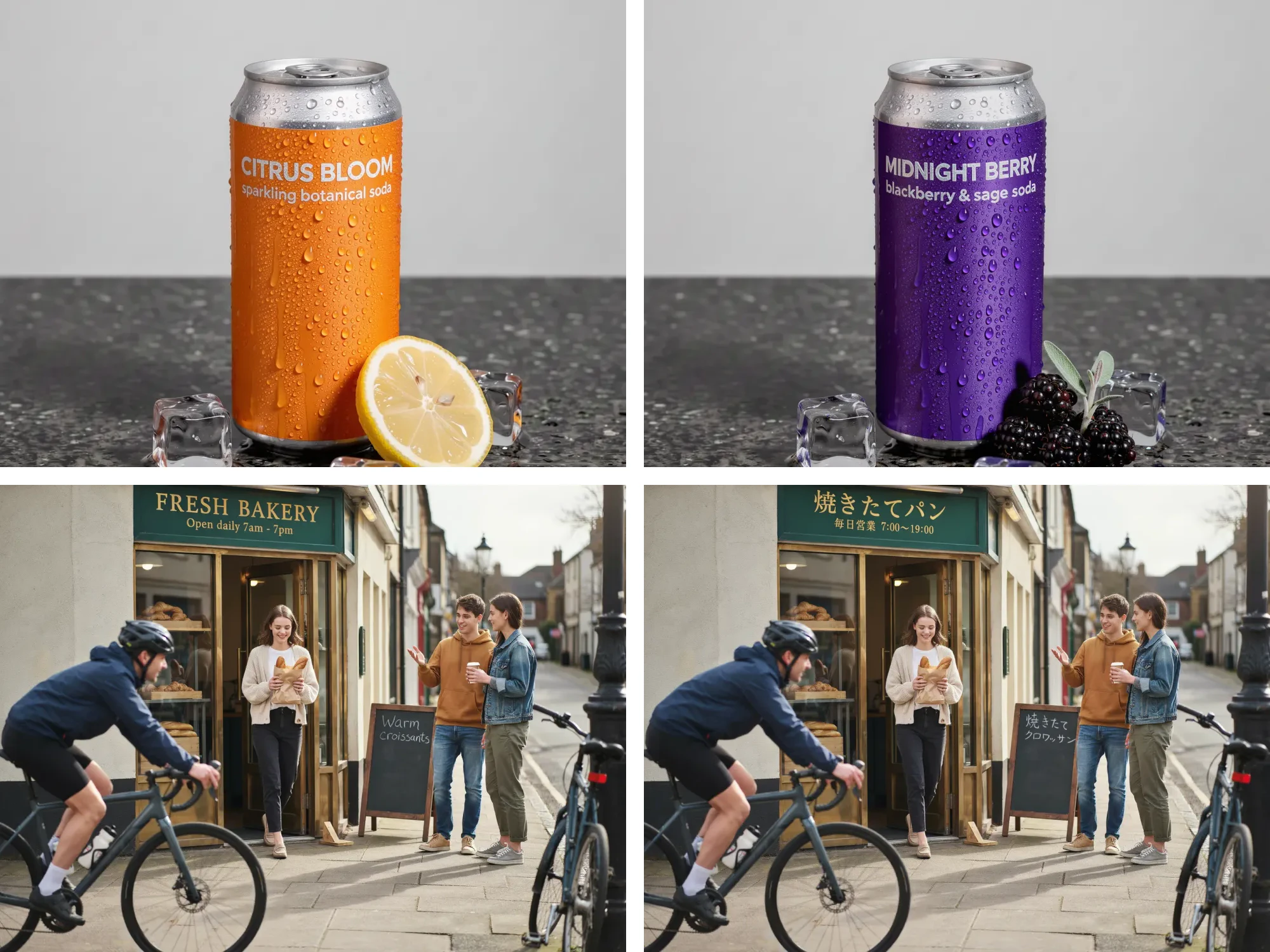
Key takeaways
- FLUX 3 kept the source photo closest in our side-by-side tests, handles several edits in one numbered prompt and takes up to ten reference images.
- Ideogram 4.5 is built for text edits and long chains of edits: it rewrites a label in the same lettering and held a five-step edit chain without drift.
- On a plain label rebrand, FLUX 3, Ideogram 4.5, Nano Banana 2 and GPT Image 2.5 Sunburst all got it right, so price and speed decide.
- GPT Image 2.5 Sunburst restyles the most and renders a true 4K for 4 credits; Nano Banana 2 is the free everyday pick at 1K and 2K.
- Every edit prompt works better with three habits: quote the exact words, give colors as hex codes, and list what stays.
On this page
- The short answer
- What makes an editing model good
- FLUX 3: change one thing, keep the rest
- Ideogram 4.5: text, and edit after edit
- Same prompt, side by side
- How they compare with GPT Image 2.5 and Nano Banana
- Edit prompts, side by side
- What an edit costs
- Editing your own photo in Studio
- Frequently asked questions
As of October 2026, five models in ReelyArt Studio handle most serious image editing. They are FLUX 3 from Black Forest Labs, Ideogram 4.5, OpenAI's GPT Image 2.5 Sunburst, and Google's Nano Banana 2 and Nano Banana Pro. Pick FLUX 3 when a photo or a product has to survive the change, and Ideogram 4.5 when the edit involves words or a long run of edits. GPT Image 2.5 Sunburst suits a polished final, and Nano Banana 2 covers free everyday edits.
FLUX 3 and Ideogram 4.5 are the newest of the five, and both were built for editing. Below is what each one does well, how to prompt it and where it slips, followed by side-by-side tests on the same prompts and a cost table. Every example was made with the model named under it, using the prompt shown.
The short answer
| If the edit is | Start with | Why |
|---|---|---|
| Recolor, replace or remove, and the rest must stay put | FLUX 3 | Kept the source closest in our side-by-side tests |
| New words on a label, sign or poster | Ideogram 4.5 | Rewrites text in the same lettering |
| Many edits in a row on one image | Ideogram 4.5 | Built so edits do not pile up artifacts |
| One scene from several photos of people, products and places | FLUX 3 | Takes up to ten reference images |
| A polished final with styled light | GPT Image 2.5 Sunburst | Restyles the most, true 4K for 4 credits |
| A face or a character in a new scene, for free | Nano Banana 2 | Keeps identity, free at 1K and 2K |
| A 4K final with small text or a busy scene | Nano Banana Pro | Google's flagship, on paid plans |
What makes an editing model good
Generating a picture and editing one are different jobs. An editing model is judged on three things:
- What it leaves alone. Change the color of a coat and the face, the street and the light should stay the same.
- Text. A label edit should change the words and keep the font, the size and the placement.
- Repeated edits. Edit the result, then edit that result. Weaker models soften detail and shift colors a little more on every turn.
The fourth job is references: building one scene from separate photos of a person, a product and a place. The two new models lean different ways. FLUX 3 leans toward control and references, and Ideogram 4.5 toward text and long chains of edits.
FLUX 3: change one thing, keep the rest
FLUX 3 Image is the image model in Black Forest Labs' FLUX 3 family, announced in July 2026 and released on October 1, 2026. The same model generates and edits: with no images attached it draws from the prompt, and with images attached it edits or combines them. There is no mask and no separate edit mode. Black Forest Labs' own guide says to write the change as an instruction and to refer to attached images by their position.


That edit changed three things in one prompt: the label color by hex code, both lines of label text in the same font, and the garnish. The condensation and the ice are the same droplets.
What FLUX 3 does best
- Precise single edits. Recolor, replace, remove, move, resize or relight with one sentence. Pixels outside the change usually stay as they were, while shadows and reflections adapt to the new object.
- Several edits in one request. A numbered list works. In the skatepark shot below, a recolor, an added dog and a removed trash can all landed in one generation, and the mid-air pose did not move.
- References. Up to ten images, called image 1 to image 10 in the order you attached them, each with its own job: a person, a product, a place or a style to borrow.
- Layout. Plain words like left, center and right, or a JSON list of boxes on a 0 to 1000 grid for exact placement.
- Size. Five real output sizes, from 768 to a native 4K of 5456x3072 at 16:9.


How to prompt a FLUX 3 edit
Name the target, say what it becomes, then list what stays:
Change the trench coat to cobalt blue #1E40AF. Keep the woman, her pose, face, hair, the rest of her outfit, the bag, the crosswalk, the street and the light exactly unchanged.
For several edits, number them and close with one keep clause:
Make three changes: 1) change the skateboarder's grey hoodie to bright red #E11D48, 2) add a golden retriever sitting at the top edge of the ramp watching him, 3) remove the green trash can. Keep the skateboarder's pose and face, the board, the graffiti wall, the sunset and everything else exactly unchanged.
Three habits help. Use a hex code when the color matters, because "blue" lands any blue. Skip quality words like "masterpiece": FLUX 3 has no negative prompt and expands short prompts by itself, so describe what you want to see. And edit at the source image's aspect ratio. At the same shape the change happens in place; a new shape makes the model recompose the scene.
Where FLUX 3 slips
Ten references work, but fine placement loosens near the limit. In our ten-image test the faces and the soda can carried over while the bag was barely visible; with five or fewer, every detail held. Layout boxes are a strong hint rather than a guarantee, and very small elements can drift. Its 4K tier is also the most expensive single image in Studio, at 20 credits.
The FLUX 3 model page has every example from our test set, including the reference composites, the JSON layouts and the typography.
Ideogram 4.5: text, and edit after edit
Ideogram announced 4.5 on September 30, 2026, as an editing model first. Its launch announcement makes one claim above the others: leading models add artifacts, pixel shifts and color changes with each edit, and 4.5 is built so that this buildup does not happen. That is what makes long chains of edits practical.
We tested it with five edits in a row, each one run on the previous result, never on the original:


The woman, the window, the table and the floor kept their shape and color through the first four steps. The fifth step changed the light on purpose, so the walls and floor darkened with it.
What Ideogram 4.5 does best
- Text inside an edit. Change one word on a label and it keeps its script lettering, color and size. Recolor a box and its wordmark separately, each by hex code.
- Localization. Translate the words on a shop front or a package, and each line keeps its style and place.
- Long edit chains. Edit, look, then edit again without the rest of the picture softening.
- Speed. In our tests an edit took 6 to 13 seconds at Low and Medium, and about 54 seconds at High.
- 2K at every tier. From a text prompt, Low, Medium and High all render 2K; the tiers buy effort. With an image attached, the result takes that image's shape and size.


How to prompt an Ideogram 4.5 edit
Start with "Edit image 1:", give the one change with any new words in quotes, then list what stays:
Edit image 1: on the bottle label, change the script word "Original" to "Oat Vanilla", written in the same script lettering, same colour and size. Keep everything else exactly the same: "NORTH ROAST", "COLD BREW", the volume line, the bottle, the hand, the wall and the palm shadows.
Keep to one change per edit when you chain them, and quote every word that should appear. For new posters and packaging, describe the copy in reading order: headline, then subline, body and footer.
Where Ideogram 4.5 slips
Small text you did not quote can come out garbled; on our tea box range, the tiny descriptor lines were not real words. On a set of kombucha cans it used a sans-serif wordmark where the prompt asked for a serif. Studio takes up to five references for it, half of what FLUX 3 takes, and the result always follows the first image's shape, so attach your main photo first. High also costs 8 credits once an image is attached, against 5 from a text prompt.
The full edit chain, the text edits and the typography set are on the Ideogram 4.5 model page.
Same prompt, side by side
We ran the same prompts with the same inputs across models, all at 2K, with GPT Image 2.5 Sunburst at its high setting and Ideogram 4.5 at Medium. The relight test was run before Ideogram 4.5 arrived, so it has three models.
A label rebrand
Edit image 1: rebrand the jar label. Change "DEW" to "LUMA" and change "Hydrating Gel Cream" to "Overnight Repair Mask". Keep "50 ml · 1.7 fl oz". Use the same font, size and placement, and keep the jar, lid, stone, droplets, leaf and light exactly the same.


A four-way draw. Every model swapped both lines in the same font and left the jar, the droplets and the leaf alone. For a plain label edit, any of the four will do, so price and speed decide.
A background swap with relighting
Place the dancer in a narrow neon-lit Tokyo side street at night after rain, with glowing signs and colourful reflections on the wet asphalt behind and below him. Relight him with matching cool blue and magenta neon light. Keep his exact mid-air pose, face, body proportions and clothing unchanged.


All three moved the dancer to a neon street and relit him convincingly. FLUX 3 kept the pose and the face closest to the source. GPT Image 2.5 Sunburst restyled the scene the most, with a wider street, more signs and stronger color.
Three references, one ad
Summer campaign photo: the surfer from image 1 walks up out of the sea in the cove from image 3, surfboard under one arm, laughing, holding the sunscreen tube from image 2 up in her other hand so the label reads clearly. Golden hour light from image 3, water dripping, candid ad photography.


All four combined the surfer, the sunscreen and the cove. Ideogram 4.5 kept image 1's portrait shape. FLUX 3 framed a wide view closer to the cove photo, which made the product hard to see. Nano Banana 2 turned the sleeveless swimsuit into a full-length wetsuit. GPT Image 2.5 Sunburst matched the zip-neck swimsuit most closely and gave the warmest light and the largest product.
A text-heavy poster
This one is a new image from a prompt, included because text is half of what these models are chosen for. Every model got every line of the race schedule right.


Ideogram 4.5 set the headline over two lines on a black layout, FLUX 3 tinted the photo lime, and Nano Banana 2 followed the prompt most literally. GPT Image 2.5 Sunburst added slogans and icons nobody asked for, plus a sportswear logo that took a follow-up edit to remove.
How they compare with GPT Image 2.5 and Nano Banana
GPT Image 2.5 Sunburst is OpenAI's most capable image model and a strong pick for editing a real photo exactly. It holds the parts you did not mention, resolves skin and fabric at 2K and 4K, and takes up to eight references, four on the free plan. In our tests it was also the model most willing to add ideas of its own: more styled light, extra slogans and icons. GPT Image 2.5 Flare is the faster sibling at the same price, so draft there and finish on Sunburst. Both render a true 4K at every ratio for 4 credits, which ties Seedream 4.5 for the cheapest 4K in Studio.
Nano Banana 2 keeps a face, a mascot or a character recognizable through a new outfit or scene, and most Studio templates are built on it. It takes up to eight references, and both 1K and 2K are on the free plan. On our poster test it followed the prompt most literally, and in the reference test it was the one that changed the outfit.
Nano Banana Pro is the flagship of the same family, for finals: true 4K, small text that stays legible, and busy scenes with several people. It runs on paid plans only.
Where the two new models fit: FLUX 3 sits beside Sunburst for precise edits, with more references, layout boxes and a more literal reading of the source. Ideogram 4.5 is the specialist for type and for chains of edits.
Edit prompts, side by side
| Model | How to write an edit |
|---|---|
| FLUX 3 | Target, change, keep. Number several edits and close with one keep clause. |
| Ideogram 4.5 | "Edit image 1:", one change with new words in quotes, then what stays. |
| GPT Image 2.5 Sunburst | A preserve list first (face, pose, light, camera, framing), then the single change. Restate the list on every follow-up. |
| Nano Banana 2 and Pro | A plain sentence naming the change and what stays. Give each reference a role. |
All four reward the same three habits: quote the exact words, give colors as hex codes, and say what stays.
What an edit costs
In Studio an edit costs the same as a new image at the tier you choose. The one exception is Ideogram 4.5 at High, which costs more once an image is attached.
| Model | On the free plan | Paid plan only |
|---|---|---|
| FLUX 3 | 768 for 1 credit, 1K for 2 | 1.5K for 3, 2K for 4, 4K for 20 |
| Ideogram 4.5 | Low for 2 | Medium for 3, High for 5 (8 with an image) |
| GPT Image 2.5 Sunburst and Flare | 1K for 2 | 2K for 3, 4K for 4 |
| Nano Banana 2 | 1K for 2, 2K for 3 | 4K for 5 |
| Nano Banana Pro | None | 1K for 4, 2K for 5, 4K for 8 |
For drafts, FLUX 3 at 768 is the cheapest edit in Studio at 1 credit, and Ideogram 4.5 at Low is free-plan text editing for 2. For 4K, GPT Image 2.5 costs the least of these five; FLUX 3 makes the largest 4K file and charges the most for it. Failed generations are refunded automatically, and plan details are on the pricing page.
Editing your own photo in Studio
The Edit button on a Studio result runs on the model that made that image, so a FLUX 3 picture is edited by FLUX 3. To edit a photo of your own, open Studio in Custom mode, attach the photo as image 1, choose the model and write the edit prompt. No mask is needed for any of the five.
The prompt and the attached images stay in the composer when you switch models. That makes a simple workflow: try the edit on a free tier first. If the result drifts or the text slips, run the same prompt on FLUX 3, Ideogram 4.5 or GPT Image 2.5 Sunburst at a higher tier. For the rest of the catalog, see all the major image models in one studio.